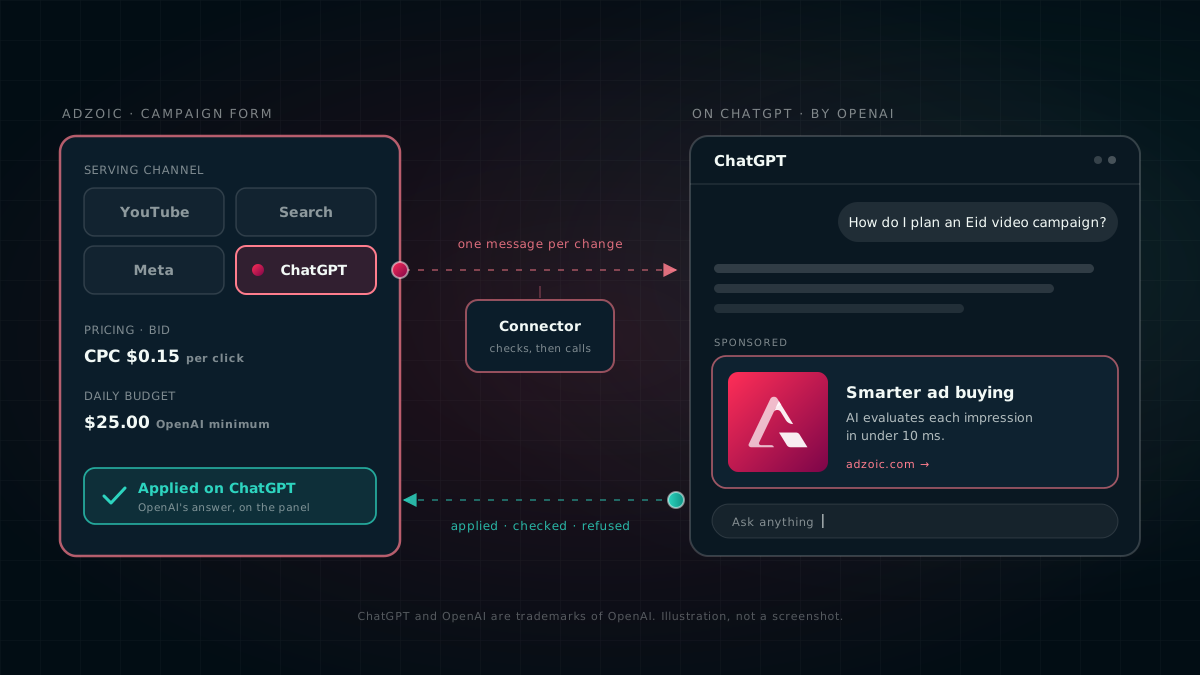
ChatGPT now sits in the campaign form next to YouTube, Search and Meta. You set a ChatGPT campaign up the way you set up any other campaign; the dashboard builds it on OpenAI's side, keeps it in step with every save, and shows you what OpenAI did with each change.
Ads inside AI assistants stopped being a thought experiment this year. We wrote about what that means for advertisers in Asia in August. What buyers asked us next was practical: can it run from the same place as everything else, under the same approvals, in the same report? It can now.
One form, one more channel
Open a campaign, go to Name & Type, and pick ChatGPT under Partner networks. A partner network replaces Web, App and CTV for that campaign, so our own real-time bidder never serves it: OpenAI does. The creative type is Banner / Image.
From there it is the form you already know. Every field you fill in has a home on ChatGPT:
| In the campaign form | On ChatGPT |
|---|---|
| Status: Active, Paused or Completed | Campaign resumed or paused (never archived) |
| Daily or total budget, less margin | Campaign budget, in the ad account's currency |
| Start and end date | Campaign start and end |
| Location; device type and OS | Countries and platforms |
| Pricing model and bid, less margin | The bid on the live ad group |
| Approved image creatives | Chat-card ads, created, updated or paused to match |
Nothing about a ChatGPT campaign needs to be set by hand in OpenAI's Ads Manager. The form is the one place it is configured, which is the point: one source of truth means nobody has to wonder which tab has the real budget.
How a change travels
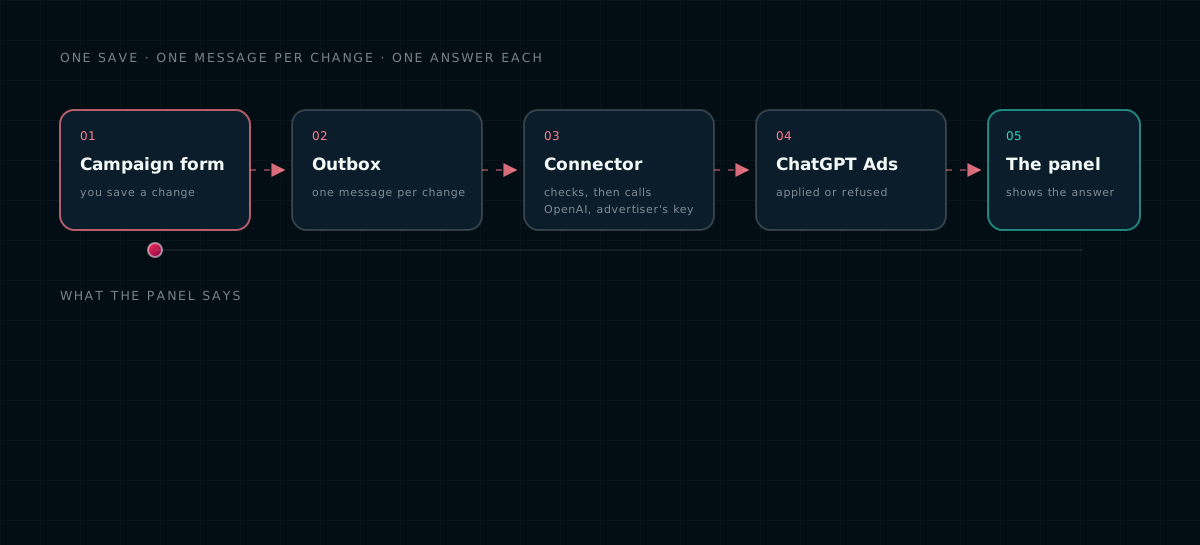
When you save, the dashboard turns each change into one message. Our ad-channel connector checks it against OpenAI's rules first, then calls the OpenAI Ads API with the advertiser's own key, and reports back. Every change is sent once, after the whole save, from the campaign as you left it: not field by field while you are still typing.
Each advertiser's key is stored encrypted on our side by engineering. It is never pasted into the dashboard, a chat or an email, and it only works for that advertiser's own ad account.
Pricing: CPC or CPM, chosen once
ChatGPT takes two pricing models, and your choice also sets OpenAI's campaign objective. That objective cannot change after the campaign is created, so pick the one you mean:
Pay per click
Billed per click. We send your CPC, less margin, as the bid per click.
Pay per thousand
Billed per impression. OpenAI bids per single impression, so we send your CPM, less margin, divided by 1,000.
That last conversion is the kind of detail that goes wrong quietly. Send a $4 CPM as a $4 bid per impression and you have asked to pay a thousand times too much. We do the division for you, and we refuse any other pricing model (CPA, CPV and so on) on save rather than guess what it should mean on ChatGPT.
Budget, dates, places and devices
- Budget. ChatGPT receives the budget less margin, converted into the ad account's currency. OpenAI's minimum daily campaign budget is 25 USD, and the form refuses a daily budget that would land under it after margin, so you find out at save time rather than from a rejection later.
- Dates. The end date runs to the end of that day on the campaign's clock. A start date is sent only while it is still in the future, because OpenAI cannot move a start back.
- Countries. Taken from Location & Audiences. At least one is required; a ChatGPT campaign with no country is not sent.
- Devices. Personal computer maps to desktop web; smartphone and tablet map to iOS and Android, web and app, narrowed by the OS you pick. Pick nothing and every platform is in.
The ad is a chat card
On ChatGPT an ad is a chat card: an image, a title and a short body, linking to your creative's click URL. It appears clearly marked as sponsored, separate from the answer, as OpenAI describes in its approach to advertising.
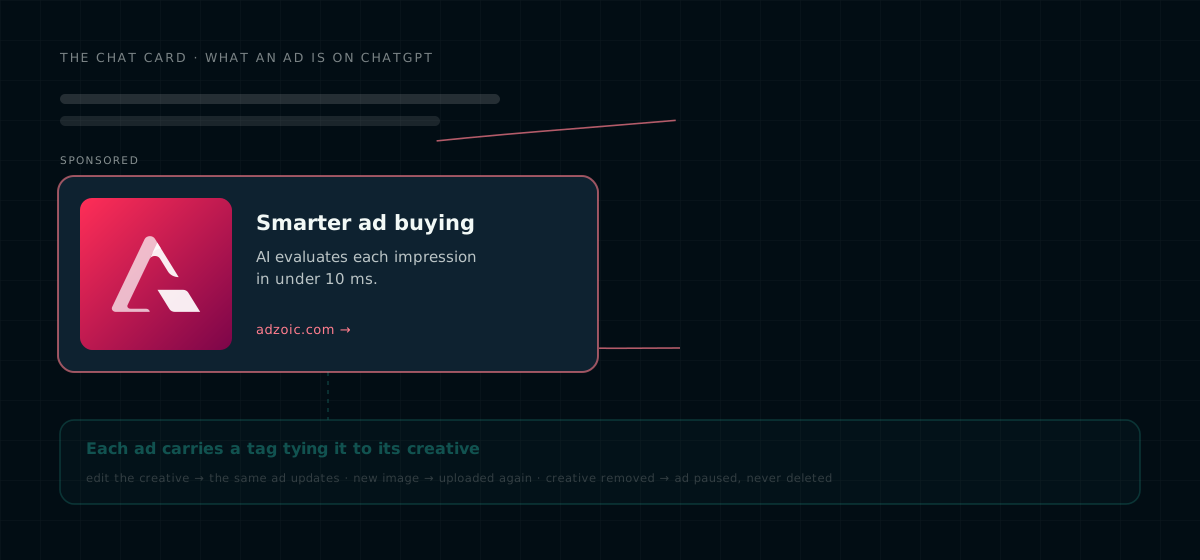
- Image. An approved banner with a public HTTPS image. A square image suits the card best.
- Title. 3 to 50 characters. Leave it blank and the creative's name is used, then the campaign's.
- Body. Up to 100 characters. One clear line beats a crammed one.
Put the creative in a creative set, approve it, and add the set to the campaign. From then on, saving the campaign, or editing an attached creative's title, body, link or approval, updates the ads on ChatGPT. Each ad carries a tag that ties it to its creative, so an edit changes the existing ad instead of piling up new ones. Remove a creative and its ad is paused, never deleted, so its history stays in your reports.
Create on ChatGPT, or link what you have
The campaign page has a Partner delivery → ChatGPT Ads panel with two ways in:
- Create on ChatGPT builds the campaign in the advertiser's ad account from the form: one campaign, paused; one ad group with your bid; and a chat card per approved image creative. The panel shows exactly what will be sent before you press the button.
- Link an existing campaign by its OpenAI campaign and ad account ids, for campaigns that were made in Ads Manager first.
Either way, the campaign's ChatGPT delivery is pulled into reports every hour as its own ChatGPT row: impressions, clicks, conversions and spend, next to every other channel. A campaign can also stay on our own bidder and be linked to a ChatGPT campaign for reporting only; then the form sends nothing to ChatGPT, and only the panel's buttons act on it.
You see what OpenAI said
Most integrations tell you a change was sent. The panel tells you what happened to it. Under Control on ChatGPT it lists the latest changes, each with OpenAI's answer:
OpenAI accepted the change.
Checked against OpenAI's rules, not sent. Used while ChatGPT writes are in dry run.
Not applied, with the reason in plain words, so you know what to fix.
Still on its way. Refresh in a minute.
A change the dashboard refuses before sending, such as targeting with no country, shows as a yellow Last change not sent warning with its time. It clears itself once that kind of change goes through. Nothing is dropped silently.
Press Show ads and the panel reads the campaign's ads straight from OpenAI. Ads that come from a creative are driven by the dashboard: change the creative, not the ad. Ads that were made in Ads Manager are marked as such, and you can pause or resume them from the panel.
Launching is one deliberate step
A campaign created from the dashboard arrives on ChatGPT paused, with its ad group and ads already live underneath. Approving the campaign so it becomes Active, or pressing Resume on ChatGPT, is the whole launch. Pausing works the same way in reverse: set the campaign to Paused or Completed, delete it, or press Pause on ChatGPT.
Before you launch, two checks are worth the minute they take: every ad you do not want is paused, and the budget and bid in the panel's latest changes both say Applied on ChatGPT.
OpenAI has not enabled account-level spend limits for our ad accounts yet, so a daily limit set on the panel is refused today. Until it is, the campaign's daily budget (at least 25 USD) is the only cap: a resumed campaign can spend up to its budget each day. Set it to what you are willing to spend in a day, not a placeholder.
Limits at a glance
| Limit | What it means |
|---|---|
| 25 USD | Minimum daily campaign budget, after margin |
| CPC or CPM | The only pricing models; the objective is fixed when the campaign is created |
| CPM ÷ 1,000 | OpenAI's bid is per impression on a CPM campaign |
| 3–50 characters | Chat card title |
| Up to 100 characters | Chat card body |
| 1 country or more | Required in Location |
What we do not do yet
- Total budgets are not checked against the minimum. The 25 USD check applies to daily budgets; a total budget has no such check yet.
- One live ad group per campaign. Ads need exactly one live ad group to attach to. A campaign with several, made by hand in Ads Manager, needs the extras archived first.
- Image chat cards only. The channel takes Banner / Image creatives today.
- Account spend limits. Waiting on OpenAI, as above.
Getting started
The ChatGPT channel is switched on per advertiser by your account team, who will connect your OpenAI ad account and store its key. After that it is the campaign form: pick ChatGPT, choose CPC or CPM, set a budget of at least 25 USD a day, attach an approved square creative with a good title, and approve. Talk to your account manager to get set up, or if one of the limits above is in your way.
Questions we get asked
Can I run ChatGPT Ads from AdZoic?
Yes. ChatGPT is a serving channel in the AdZoic campaign form, next to YouTube, Search and Meta. The dashboard creates the campaign in the advertiser's OpenAI ad account, keeps budget, dates, targeting, bid and ads in step with every save, and shows OpenAI's answer to each change.
Which pricing models does ChatGPT support?
CPC (billed per click, OpenAI objective Clicks) and CPM (billed per impression, objective Reach). The choice is fixed when the campaign is created. For CPM, AdZoic divides the CPM by 1,000, because OpenAI bids per single impression.
What is the minimum budget for ChatGPT Ads?
OpenAI's minimum daily campaign budget is 25 USD. AdZoic refuses a daily budget that comes to less than that after margin, at save time.
What does a ChatGPT ad look like?
A chat card marked as sponsored and shown separately from the answer: a square image, a title of 3 to 50 characters and a body of up to 100 characters, linking to the creative's click URL.
Can I use a campaign I already made in OpenAI Ads Manager?
Yes. Link it by its OpenAI campaign and ad account ids, and its delivery is pulled into AdZoic reports every hour as its own ChatGPT row.
ChatGPT and OpenAI are trademarks of OpenAI. They are used here only to identify the service this product works with. AdZoic is not affiliated with or endorsed by OpenAI. The illustrations in this post are drawings, not screenshots of ChatGPT.
Ad formats, minimums, pricing models, policies and availability on ChatGPT are set by OpenAI and can change at any time. Advertisers remain responsible for their creative, their claims, and for complying with OpenAI's advertising policies and applicable law in every market they run in. Nothing here is a promise of a particular result.