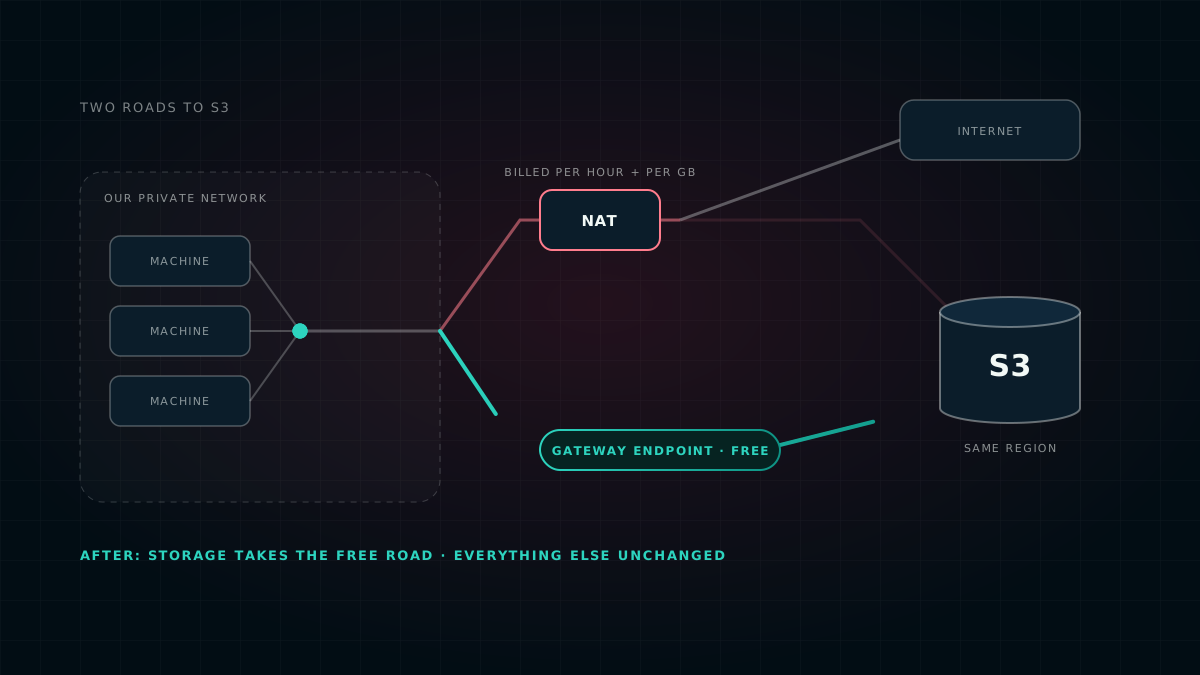
For its first few weeks, our production platform sent every byte bound for Amazon S3 — logs, backups, the building blocks of our software — through a NAT gateway that charges for each gigabyte it handles. Nobody decided that. It was simply the default. One small change moved that traffic onto a road AWS doesn't charge for at all. This is how it works, why we did it, when it's worth doing, and the checks worth running before you try it.
First, what a NAT gateway is
Our servers live on a private network. They can reach out to the internet — to fetch updates, say — but the internet can't reach in. The piece of AWS that makes that one-way door work is called a NAT gateway.
It is billed two ways: for every hour it exists, and for every gigabyte that passes through it. AWS's own pricing page is explicit that the per-gigabyte charge applies “regardless of the traffic's source or destination”. That phrase is the whole story of this post.
The part that surprises people
Moving data between a server and S3 — AWS's file storage — inside the same region doesn't normally cost anything. But if that data travels through a NAT gateway on the way, the NAT gateway's per-gigabyte charge still applies. The storage is free to reach. The toll road to it isn't.
And more traffic heads for S3 than you might expect. In our production platform it includes:
- Logs, shipped continuously for safekeeping.
- Backups of our databases.
- The building blocks of our software. Before a server can run one of our programs, it downloads a packaged copy of it, called a container image. AWS's image registry keeps the bulk of every image in S3 — so most of those downloads are S3 traffic too, even though nobody thinks of them that way.
All of it was taking the toll road.
The free road: a gateway endpoint
AWS offers a second way to reach S3 from a private network: a gateway endpoint. Think of it as a private road from your network straight to S3, entirely inside AWS. It has no hourly charge and no per-gigabyte charge.
It works through the network's route tables — the list of directions that tells each piece of traffic where to go. Before, there was one general direction: “anything leaving the network goes to the NAT gateway.” The endpoint adds a more specific one: “anything going to S3 takes the private road.” When two directions both match, AWS always follows the more specific one. So traffic to S3 takes the private road, and everything else carries on through the NAT gateway exactly as before.
| Traffic | Before | After |
|---|---|---|
| Logs going to S3 | NAT gateway, charged per GB | Private road — free |
| Backups going to S3 | NAT gateway, charged per GB | Private road — free |
| Software image downloads (the bulk, kept in S3) | NAT gateway, charged per GB | Private road — free |
| Image registry look-ups (small) | NAT gateway | NAT gateway, unchanged |
| Everything else on the internet | NAT gateway | NAT gateway, unchanged |
The NAT gateway stays. It still has a job — it just no longer carries traffic that has a free way to go.
Why we did it — honestly
- The saving is real, and it's small. At our volume it comes to a few dollars a month — an estimate from AWS's pricing and our rough volumes, not a before-and-after measurement. It also doesn't remove the NAT gateway's hourly charge, because everything that isn't S3 still needs it. If a post like this promised you a dramatic cut, you'd be right to be suspicious.
- The stronger reason is resilience. Our backups and log shipping no longer depend on the NAT gateway being healthy. If it has a bad day, the traffic we most need to keep flowing doesn't notice.
- It costs nothing. A change that is free, a little safer and a little cheaper doesn't need to be large to be worth making.
- The saving grows with you. The toll scales with every gigabyte: double the backups, double the charge. On the private road it stays at zero. For a team moving a lot of data to S3 — media, data lakes, training data — this is one of the simplest genuine savings on AWS.
When it's worth doing — and when it isn't
It's worth doing when both of these are true:
- your servers sit on a private network and reach the internet through a NAT gateway, and
- they talk to S3 buckets in the same AWS region.
That describes a great many setups. It won't help, or needs care first, when:
- The buckets are in another region. A gateway endpoint only works within its own region. That traffic keeps its current route — not broken, just not free.
- The traffic starts outside the network — from an office, say, or another network connected to yours. The private road only serves the network it's attached to.
- A bucket's access rules are based on public IP addresses. Through the endpoint, S3 sees your servers' private addresses instead, so a rule like “only allow requests from our public IP” starts turning them away. AWS provides a different kind of rule for this situation; switch to it before you add the endpoint.
- There is no NAT gateway to begin with. Our test environment uses a simpler network without one, so there is no toll to avoid there. The endpoint is still free to add, which is why our platform includes it by default.
For us, the when was simple. Our production platform was built without the endpoint and ran for its first few weeks paying the toll on every S3 byte. It came up during a week we spent measuring what production was actually doing — the same week we found our analytics database drowning in tiny writes, which is written up in measure first, buy last. The endpoint is now on by default in our platform code, so every new environment has it from its first day.
How we made the switch
- We looked at the route tables, not the diagram. They showed a single direction for traffic leaving the private network — to the NAT gateway — and no endpoints at all.
- We checked the three things that can break, before touching anything: which region each bucket lives in, whether any access rules depend on a public IP address, and whether the software that writes to S3 reconnects on its own — which matters, because AWS notes that adding an endpoint drops open connections to S3.
- We made it one small, reviewed change in code. The endpoint is a single entry in our network definition. Terraform's preview of the change showed nothing deleted and nothing replaced.
- We attached it to every route table in use, not only the ones our servers need today. It costs nothing, and nothing changes if a workload is ever moved.
- We checked it afterwards. The new direction was active, the NAT gateway's route was untouched, and our log and database services — the main writers to S3 — had neither restarted nor logged a single storage error.
- We made it the default, so the next environment doesn't repeat those first few weeks.
More than a month later, while writing this post, we checked again rather than trusting the code. The private road is still in place on every route table in use, and the NAT gateway is still there for everything else. The running system still matches the code — which is the only kind of infrastructure claim worth making.
Defaults cost money quietly. Nobody chose to send our backups and logs down a toll road; it was simply where the traffic went until someone looked at the route tables. The cheapest improvements are often the ones where you stop paying for something nobody decided to buy.
Tips and gotchas
What we would tell anyone about to do the same:
- Find out what your NAT gateway carries first. AWS publishes traffic figures for every NAT gateway. The biggest sources tell you which change will actually pay off, before you make any of them.
- Check bucket rules for IP-based conditions before you switch, not after. It's the one common way this change breaks something.
- Expect a brief blip. Adding the endpoint drops open connections to S3. AWS recommends doing it when nothing critical is running, or making sure your software reconnects on its own.
- Careful when you restrict the endpoint. An endpoint can carry its own rules about which buckets it serves. If you tighten them, remember that AWS services use S3 behind the scenes — container image downloads are the classic example, and they fail with a confusing “access denied” when the endpoint doesn't allow them.
- Attach it to every route table. It's free, and it removes one way for two parts of the same network to behave differently.
- DynamoDB gets the same free road. It is the only other AWS service with this kind of endpoint. If you use it, add both.
- Mind the zones. A NAT gateway lives in one data-centre zone, and machines in other zones pay extra to cross over to it. Keeping busy machines in the NAT gateway's zone reduces that; running one NAT gateway per zone removes it, at the price of another hourly charge. The private road to S3 skips the crossing altogether.
- Know where the free roads end. For other AWS services, the equivalent private connections — interface endpoints — are not free: they charge by the hour in every zone, plus per gigabyte. They pay off only when that service carries a lot of your traffic.
- Make it the default in your templates, so no environment ships without it.
This is one of the decisions in measure first, buy last, our wider write-up of how we keep the platform lean. For how the pieces fit together, see the architecture post.
This post deliberately contains no exact figures. Where it describes AWS pricing it does so in relative terms: AWS publishes the actual prices, which differ by region and change over time, so check them for your own region before deciding. Descriptions of how gateway endpoints, NAT gateways and route tables behave follow AWS's own documentation, listed below. The account of the switch itself comes from the change's own written record; our re-check of the live setup was read-only and made on 19 September 2026. We leave out our AWS bill, traffic volumes, network layout, account details and security settings. This describes our own setup and is not advice for yours.
Sources
- Gateway endpoints for Amazon S3 — AWS documentation: same-region only, private source addresses, dropped connections when added.
- Amazon VPC pricing — how NAT gateways are billed.
- Pricing for NAT gateways — AWS documentation, including ways to reduce the charge.
- How route priority works — why the more specific route wins.
- How do I reduce data transfer charges for my NAT gateway? — AWS Knowledge Center.
- Container image layers and S3 — AWS Knowledge Center: image layers are downloaded from S3.